How to run Planning Poker step by step
Prepare the backlog, vote independently, discuss meaningful differences, and leave each round with a team-owned estimate.

Planning Poker works when the cards create a useful conversation—not when the team tries to guess the “correct” number. A good session gives everyone the same backlog context, protects independent judgment until reveal, and uses different estimates to uncover assumptions before work enters a sprint.
This guide gives you a repeatable agenda for one facilitator, one Product Owner or backlog owner, and the people who will help deliver the work.
In this guide
- The short version
- Prepare the backlog and participants
- Use a practical 45-minute agenda
- Calibrate and present each item
- Vote, reveal, and discuss the spread
- Revote, split, or pause
- Review the five-item example
- Avoid common mistakes
- Use the facilitator checklist
The short version
For each backlog item:
- Explain the user outcome, scope, and acceptance conditions.
- Let the team ask clarifying questions.
- Ask every estimator to choose a card privately.
- Reveal all cards together.
- If the spread matters, hear the reasoning behind the low and high votes.
- Clarify the item, split it when necessary, and vote again.
- Record the estimate the team agrees to use, then move to the next item.
Planning Poker is an estimation practice, not a required Scrum event. The current Scrum Guide leaves sizing methods to the team, while emphasizing that the people doing the work are responsible for sizing Product Backlog items.
Before the session: prepare work that can be discussed
A voting room cannot compensate for a backlog item nobody understands. Prepare a small set of near-term items rather than bringing the entire backlog.
For every item, make sure the team can see:
- the user or business outcome;
- what is included and explicitly excluded;
- acceptance conditions or an example of expected behavior;
- known dependencies, constraints, and affected systems;
- open questions that may change the size;
- a link to supporting designs or technical context when relevant.
Do not remove every uncertainty before estimation. Uncertainty is part of what the estimate should expose. But the team needs enough context to distinguish a small implementation detail from an unresolved product decision.
Choose one scale before voting starts
Many teams use a Fibonacci-like sequence such as 1, 2, 3, 5, 8, 13, 21. The growing gaps reflect that confidence usually decreases as work becomes larger or less understood. Agilo also supports other built-in scales and custom card sets.
Treat story points as relative team-specific sizes. A 5 is useful because the team understands how it compares with its own 2 or 8; it is not a universal number of hours and should not be copied between teams as a conversion table.
Invite the right people
The people expected to deliver the work should vote. The Product Owner or backlog owner explains intent, priority, and trade-offs. A facilitator keeps the sequence moving, makes space for quieter participants, and stops the discussion from becoming a negotiation toward a preferred number.
In Agilo, participants need accounts to join a room and vote. Create the room before the session, select the estimation system, add or import the first items, and share the invitation with enough time for everyone to join.
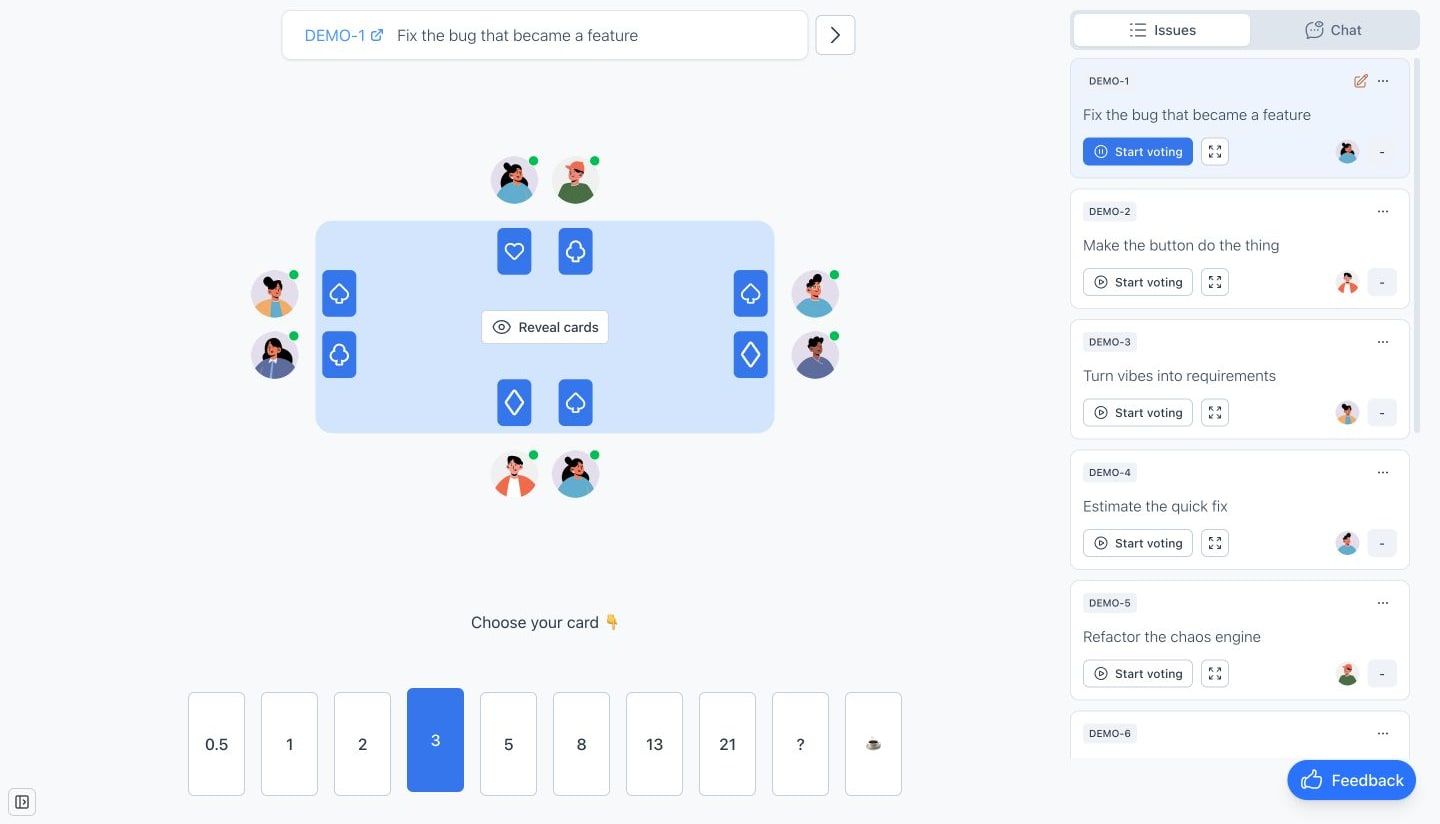
Current Agilo interface: eight fictional participants have voted, while every estimate stays hidden until reveal.
A practical 45-minute agenda
Use this as a starting point, then adjust it to the number and complexity of items.
| Time | Activity | Desired result |
|---|---|---|
| 0–5 min | Set the scale and ground rules | Everyone knows what the cards mean and who votes |
| 5–10 min | Calibrate with one familiar item | The team has a shared reference point |
| 10–38 min | Estimate the prepared backlog items | Each item is understood, discussed, and recorded |
| 38–43 min | Review unresolved or oversized work | Owners and next clarification steps are clear |
| 43–45 min | Close the session | Estimates and follow-ups are captured |
Five well-prepared items are often more useful than fifteen rushed votes. If the team repeatedly needs long product discovery during the session, move those items back to refinement and keep Planning Poker focused on work that is ready for a sizing conversation.
Step 1: calibrate with a familiar reference
Start with a recently completed item whose shape the team remembers. You are not rewriting history to produce a perfect score. You are giving the room a shared comparison: “This item had one UI change, one API change, and known test coverage; for us it represents a 3.”
Use references from the same team and product area when possible. A mobile team’s 5 and a platform team’s 5 do not need to mean the same thing.
Step 2: present one backlog item
The backlog owner explains the outcome and boundaries in a few minutes. Avoid walking through a proposed implementation as if it were already decided. Developers may see a simpler path—or a dependency that changes the whole estimate.
A useful opening sounds like this:
A signed-in user can export the current report as CSV. This round includes the visible table filters, but not scheduled exports or custom column mapping.
Then let the team ask questions. If a question changes the scope, update the item before voting.
Step 3: vote privately and reveal together
Each estimator selects a card without seeing other choices. Hidden votes reduce anchoring on the first number, the most senior person, or the facilitator’s expectation.
Reveal only after everyone has voted. Agilo can reveal cards manually or automatically after all participants have voted, depending on the room settings. A facilitator can also use the room timer when the team needs a gentle boundary for questions or voting.
Do not rush people who choose ?. That card is useful evidence: the item may lack context, sit outside someone’s expertise, or contain an assumption worth making visible.
Step 4: discuss the spread, not every number
If the votes cluster around adjacent values, the team may need only a brief confirmation. If the spread is wide—for example, 3, 3, 5, 8, 13—start with the reasoning behind the low and high estimates.
Ask questions such as:
- What does the
13include that the3does not? - Is there a dependency or failure mode others have missed?
- Are we estimating the same acceptance conditions?
- Is one person assuming reusable infrastructure that does not exist yet?
- Would splitting the item remove the main uncertainty?
The goal is shared understanding. Consensus can follow, but forcing everyone toward the same card without resolving the underlying difference defeats the exercise.
When one person votes
3and another votes13: good news—the cards are not broken. The team just found the conversation it came for. 😅
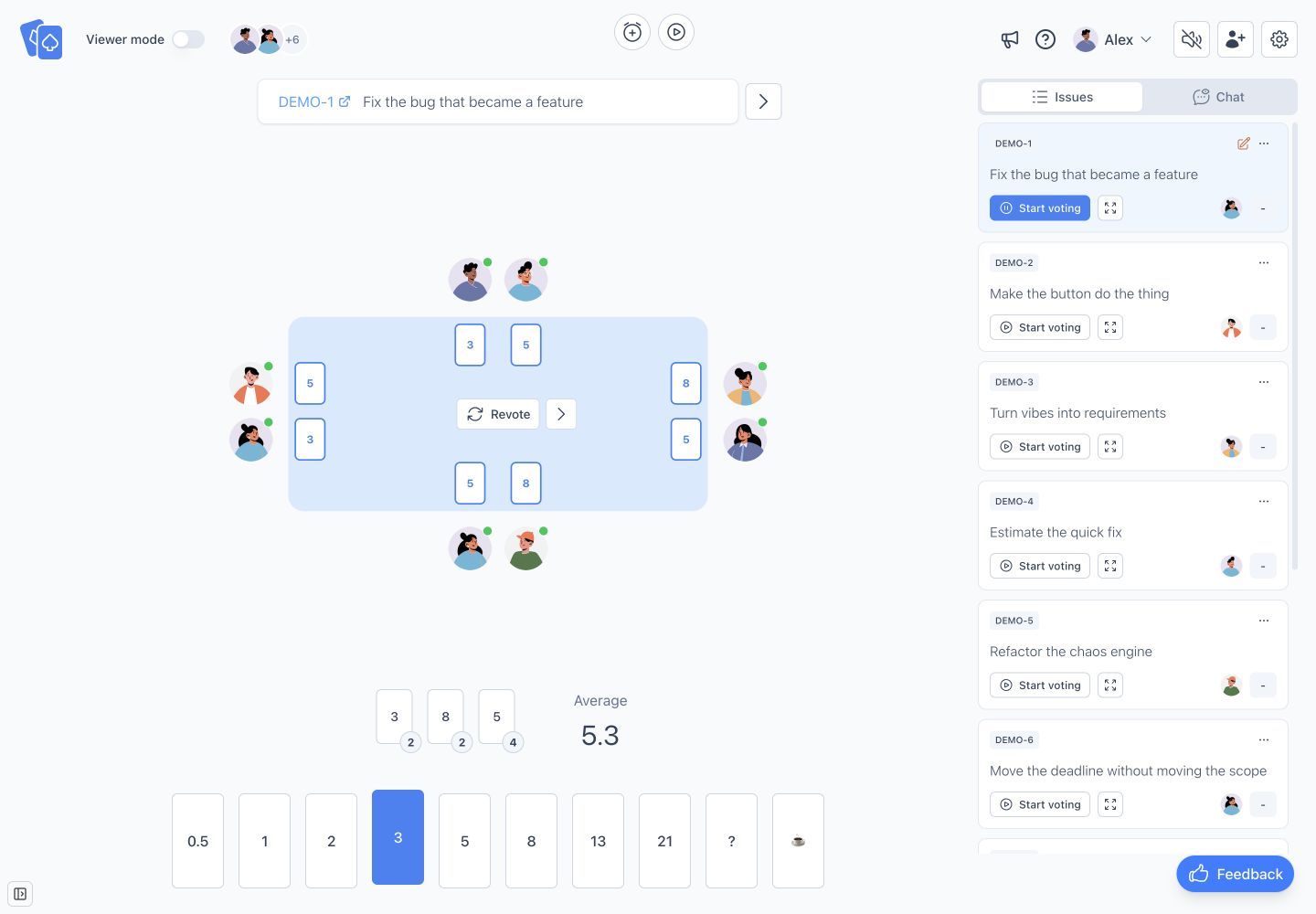
Current Agilo interface after reveal: the 3–8 spread is a prompt to compare assumptions. The 5.3 average is context, not an automatic final answer.
Step 5: clarify, split, or vote again
After the discussion, choose one of three paths:
- Revote. The item is clear and new information changed the team’s view.
- Split the item. The estimate is large because several outcomes or technical steps have been bundled together.
- Pause estimation. A product decision, dependency, or investigation must be resolved first.
Agilo supports another voting round, but it does not choose the final estimate for the team. The facilitator and estimators still decide which value reflects their shared understanding.
Step 6: record the result and move on
Once the team agrees on the estimate it will use, record it with the backlog item and select the next item while the session still has momentum. If you use the Agilo Jira integration, you can import Jira issues with their context and return the selected estimate when synchronization is configured.
Keep a separate note for follow-up questions. Do not hide unresolved scope behind a number just to finish the list.
Worked example: five backlog items
The values below belong to one fictional product team using its own reference items. They are examples of reasoning, not a universal answer key.
| Backlog item | First votes | What the team discovered | Outcome |
|---|---|---|---|
| Add an empty state to saved searches | 1, 1, 2, 2, 2 | Copy and design were ready; one extra analytics event was needed | Agreed on 2 |
| Export the filtered report as CSV | 3, 5, 5, 8, 8 | The API could stream rows, but permissions needed one shared check | Agreed on 5 after clarification |
| Add Microsoft sign-in | 3, 5, 8, 13, 13 | Account linking and duplicate-email behavior were undefined | Paused for a product decision |
| Let users reorder dashboard widgets | 5, 8, 13, 13, 21 | Desktop drag-and-drop and mobile ordering were bundled together | Split into two items |
| Show a notification when an import finishes | 2, 2, 3, 3, 5 | The difference was whether background jobs already emitted a usable event | Agreed on 3 after checking the existing event |
Consider the widget item. The low voters pictured a desktop-only layout change. The high voters included mobile gestures, persisted ordering, keyboard accessibility, and migration of existing layouts. No amount of averaging would solve that mismatch. Splitting the item made the scope explicit and produced two more meaningful conversations.
Common mistakes that weaken the session
Treating the average as the answer
An average can hide two incompatible interpretations. Discuss the spread first. The final estimate should reflect understood work, not arithmetic convenience.
Letting the most senior person vote aloud
Once one number is spoken, later estimates tend to orbit it. Keep cards hidden until reveal and ask for reasoning after the independent vote.
Debating implementation before the outcome is clear
Technical discussion is valuable, but only after everyone understands what the item must achieve. Otherwise the team may estimate different products.
Forcing an estimate for an unready item
“We need a number today” does not remove a dependency. Mark the question, assign an owner, and return when the missing decision is available.
Comparing individuals or teams by story points
Points are a local planning tool. Turning them into a performance target encourages inflated numbers and makes the estimates less useful.
Facilitator checklist
Before the meeting:
- choose 5–8 near-term items;
- add acceptance context and links;
- create the room and select the card set;
- confirm who will explain items and who will vote;
- choose one familiar reference item.
During each round:
- keep votes hidden until everyone is ready;
- hear low and high reasoning when the spread matters;
- update the item when assumptions change;
- revote, split, or pause instead of forcing agreement;
- record the selected estimate and any follow-up owner.
After the meeting:
- make sure estimates are visible in the backlog;
- resolve paused items before they reach sprint planning;
- revisit the scale only when the team finds it consistently unhelpful.
Run the workflow in Agilo
Agilo Planning Poker keeps backlog context, private voting, simultaneous reveal, repeated rounds, and the selected estimate in one room. You can add work manually or import Jira issues, use a built-in or custom card set, and move directly to the next item after the team agrees.
Create a Planning Poker room when your backlog items and participants are ready.
Sources and further reading
- Agile Alliance: Planning Poker — the basic private vote, simultaneous reveal, discussion, and additional-round pattern.
- The official Scrum Guide — the current definition of Scrum and Product Backlog sizing responsibilities.