How to run a sprint retrospective that leads to action
Use a practical 60-minute agenda to collect evidence, choose the right discussion, and leave with one or two owned improvements.

A sprint retrospective is useful when it changes how the next sprint works. A board full of honest observations is only the middle of the process; the meeting should end with a small number of improvements that have owners and can be reviewed.
This guide gives a facilitator a repeatable 60-minute flow for a team completing a two-week sprint. Shorten or extend the timeboxes to fit the team and the complexity of the sprint. The official Scrum Guide allows up to three hours for a one-month Sprint and notes that shorter Sprints usually need a shorter event.
In this guide
- The short version
- Prepare before the meeting
- Use a practical 60-minute agenda
- Collect observations independently
- Group and vote on themes
- Turn discussion into action
- Review a worked example
- Avoid common retrospective mistakes
- Use the facilitator checklist
The short version
Run the retrospective in seven moves:
- Restate the purpose and create a safe, blame-free frame.
- Review the previous improvement and relevant sprint evidence.
- Let everyone add observations before open discussion begins.
- Group related cards into themes.
- Vote to choose the few topics worth the team’s limited time.
- Explore causes and options, not culprits.
- Create one or two specific actions with an owner and a review point.
The Sprint Retrospective is not a status report or a performance review. In Scrum, its purpose is to plan ways to increase quality and effectiveness by inspecting how the Sprint went across people, interactions, processes, tools, and the Definition of Done.
Before the retrospective: prepare evidence and safety
A useful conversation starts before the call. Prepare enough evidence to help memory without turning the meeting into a metrics presentation.
Bring a small set of signals such as:
- the Sprint Goal and whether it was achieved;
- work that carried over and the reasons it moved;
- incidents, release problems, or repeated interruptions;
- cycle-time or flow changes the team already monitors;
- quality signals, including escaped defects or rework;
- the previous retrospective action and its current result.
Evidence should start questions, not end them. “Three items carried over” is a signal. “Developers estimated badly” is already a verdict.
Choose prompts that fit the sprint
A simple three-column board works well for a team that needs a direct conversation:
- What helped us?
- What got in our way?
- What should we change next?
Change the prompts when the situation changes. A release retrospective may focus on preparation, execution, and recovery. A new team may need prompts about clarity and collaboration. Do not rotate formats only to create novelty; choose the structure that helps the team inspect the work it actually did.
Decide how participation will work
Invite the whole Scrum Team. Decide who facilitates, how long silent writing will last, how votes are distributed, and whether anonymous input is appropriate. Agilo supports configurable columns, comments, reactions, voting, and optional anonymity.
Anonymity can lower the cost of raising a sensitive signal, but it does not create psychological safety by itself. The facilitator still needs to stop blame, protect people from retaliation, and keep the discussion focused on systems and choices the team can influence.
A practical 60-minute agenda
| Time | Activity | Desired result |
|---|---|---|
| 0–5 min | Open and set the frame | Everyone understands the purpose and discussion rules |
| 5–10 min | Review the previous action and sprint evidence | The team starts from facts and closes the feedback loop |
| 10–20 min | Write observations independently | More voices and signals reach the board |
| 20–28 min | Clarify and group related cards | Repeated symptoms become visible themes |
| 28–33 min | Vote on discussion priorities | The team chooses two or three topics |
| 33–48 min | Explore causes and options | The group finds a change it can influence |
| 48–57 min | Create action items | One or two improvements have owners and checks |
| 57–60 min | Close and check the meeting | Commitments and the next review point are clear |
If the team is new to retrospectives, keep the structure simple and explain each transition. Experienced teams can use shorter instructions, but they still benefit from visible timeboxes and a clear outcome.
Step 1: open with purpose, not ceremony
Start by naming the outcome:
We are here to understand how this sprint worked and choose one or two changes that can make the next sprint more effective.
Then agree on lightweight rules: assume incomplete information, speak from observed events, let people finish, and criticize the process without attacking a person.
Review the last retrospective action before creating new ones. If it was completed, ask what changed. If it was not, learn why. Skipping this step teaches the team that retro commitments disappear as soon as the tab closes.
Step 2: collect observations before the debate
Give everyone five to eight quiet minutes to add cards. Silent writing reduces the advantage of the fastest speaker and lets participants form a view before the first opinion shapes the room.
Ask for concrete observations:
- What helped us reach the Sprint Goal?
- Where did work wait, bounce back, or require rework?
- Which assumption surprised us?
- What should we protect because it worked?
- What is within our influence to change next Sprint?
One card should contain one signal. “Release readiness” is too broad. “QA received the stable build only 20 minutes before the release window” gives the team something it can investigate.
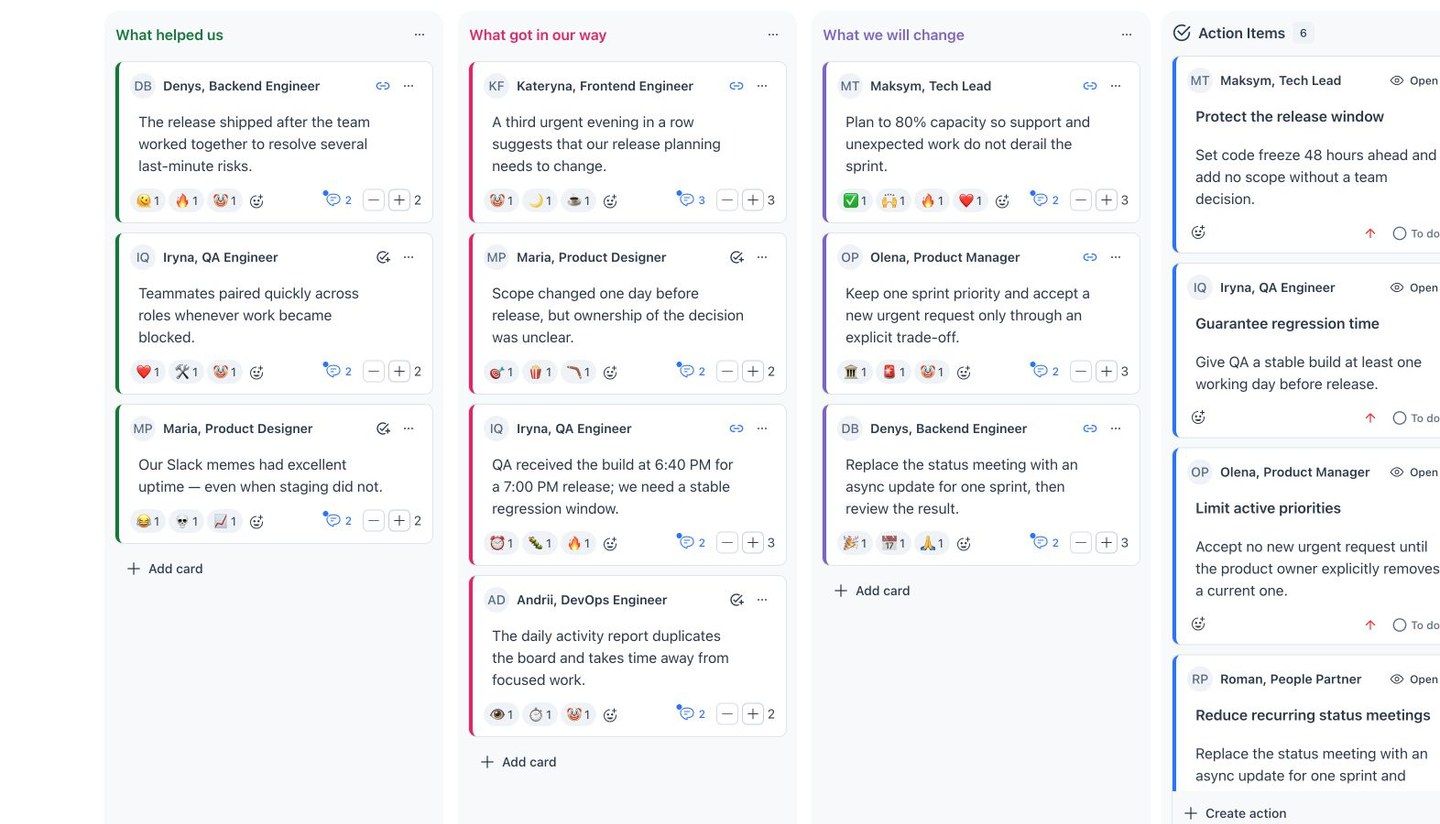
Current Agilo interface with fictional participants: observations are visible beside the action items created from the discussion.
Step 3: group signals and vote on what matters
Read the cards for clarity, not for immediate debate. Ask the author to explain an ambiguous phrase, then group cards that describe the same system or repeated effect.
For example, these cards may belong together:
- “The build arrived after the planned test window.”
- “Regression was compressed into the last hour.”
- “Two fixes were merged after code freeze.”
The shared theme might be “release changes leave no stable regression window.” Grouping prevents the team from discussing the same issue three times under different labels.
Next, vote. Voting is a prioritization aid, not a scientific measurement of pain. Select the top two or three themes, then check whether a lower-voted item represents an urgent safety, ethical, or operational risk that should not be ignored.
Step 4: explore causes without turning the meeting into court
Discuss one theme at a time. Separate the event, its effect, contributing conditions, and possible change.
Useful questions include:
- What happened, and when did we first notice it?
- What conditions made this outcome likely?
- Where did information wait or change hands?
- Which assumption or policy shaped the decision?
- What part can this team influence during the next Sprint?
- What would be the smallest experiment that gives us evidence?
Avoid asking “Who failed to…?” when the useful question is “What made the failure easy to repeat?” Individual accountability still matters, but blame usually narrows the evidence before the system is understood.
Keep the discussion bounded. If a topic needs a technical workshop or management decision, assign that follow-up instead of consuming the whole retrospective.
Step 5: create one or two actionable improvements
A good action item describes a behavior or change the team can observe. It includes:
- a clear action, not an aspiration;
- one owner who moves it forward;
- a time or event when it will be checked;
- a result that tells the team whether the change helped;
- a link to the observation that prompted it when useful.
Compare these examples:
| Weak action | Stronger action |
|---|---|
| Improve communication | The release owner posts the scope and risk summary before Wednesday refinement; review whether late scope changes decreased at the next retro |
| Test earlier | QA receives a deployable build by 15:00 one working day before release; the Tech Lead owns the check for the next two releases |
| Have fewer meetings | Cancel the weekly status call for one Sprint and replace it with an async update; the facilitator checks missed decisions at the next retro |
If every action starts with “improve communication,” the retrospective has produced a horoscope, not a plan. Make the next behavior visible. 🙂
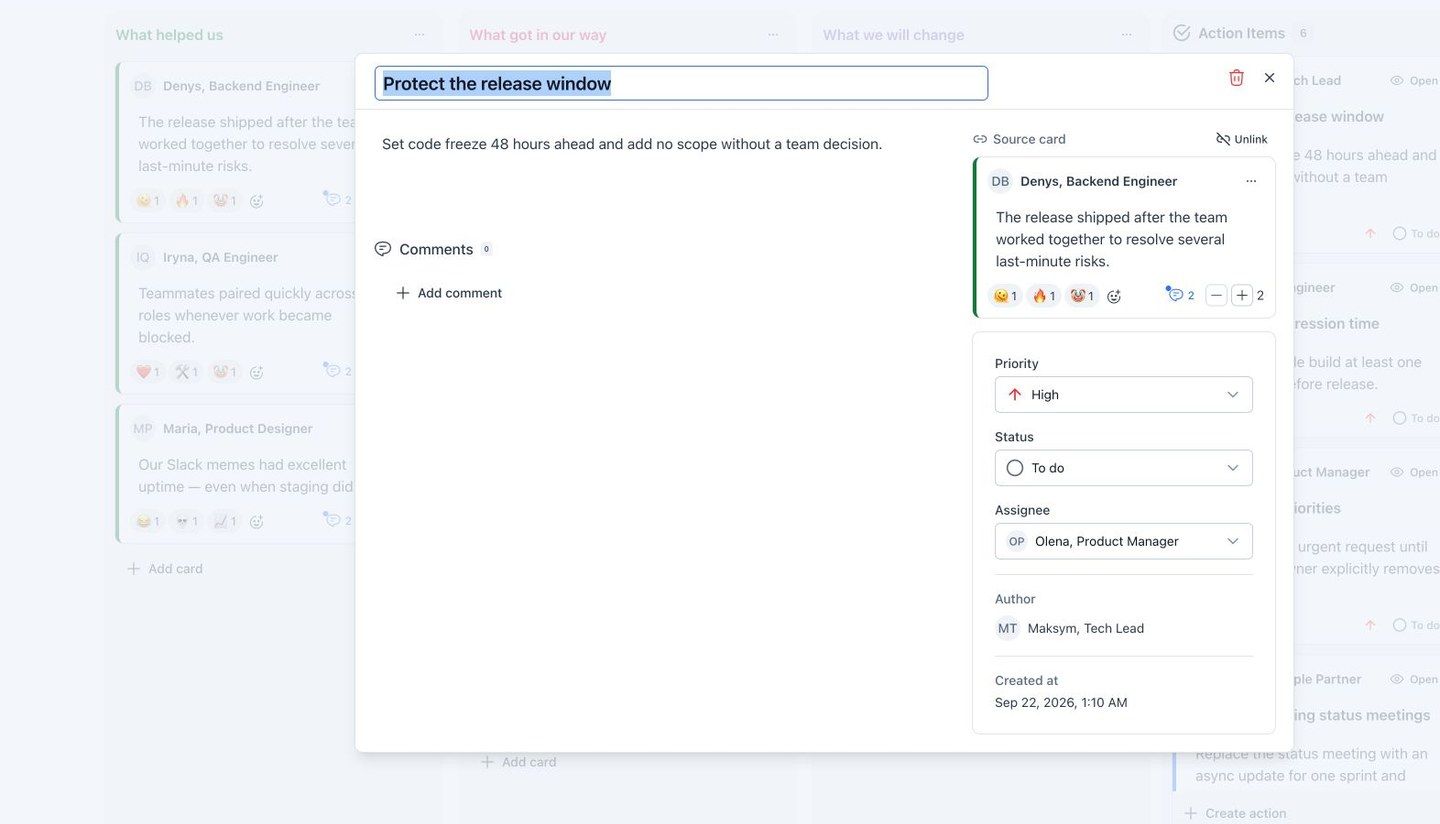
An action remains connected to the observation that created it and records priority, status, and ownership.
Two owned actions are usually more valuable than twelve intentions. Scrum.org similarly recommends prioritizing improvements and selecting the top one or two for the next Sprint when the team finds too many.
Step 6: close the feedback loop
Before the meeting ends, read each action aloud and confirm:
- the owner accepts it;
- the team understands the expected change;
- the action is within the team’s influence or has a clear escalation path;
- the review point is visible.
Add an impactful improvement to the next Sprint Backlog when that is the best way to make the work visible. Start the next retrospective by reviewing the result. Completed, changed, and abandoned experiments can all teach the team something—as long as the outcome is examined.
Close with a quick check: “Did this meeting help us choose a useful change?” Use the answer to improve the next retrospective itself.
Worked example: from sprint signal to owned action
Imagine a team that released on Friday evening.
Signals on the board
- QA received the stable build 20 minutes before the release window.
- Two “small” scope changes arrived after the planned freeze.
- Developers stayed late to repair a configuration issue.
- The release shipped, but regression coverage was reduced.
Grouped theme
The team groups the cards as “late scope changes removed the regression window.” It receives the most votes because it affected quality, overtime, and predictability.
Discussion
The group finds that code freeze was treated as a suggestion. Sales requests arrived through chat, no one had authority to reject them, and QA did not have a visible readiness checkpoint.
Chosen experiment
For the next two releases, freeze scope 48 hours before the release window. Any exception requires a visible decision from the Product Owner and Tech Lead. The Tech Lead owns the check; the team reviews late exceptions and regression time at the next retrospective.
This action does not promise “better teamwork.” It changes a decision rule, names an owner, limits the experiment, and defines what the team will review.
Common mistakes that make retrospectives feel pointless
Collecting complaints without choosing a change
Naming friction can be relieving, but repeated observation without adaptation creates cynicism. Reserve time for the action stage before the discussion expands.
Creating too many action items
A long list spreads ownership and competes with Sprint work. Choose one or two high-value changes and keep other ideas visible for later.
Ignoring the previous action
The team cannot learn whether an experiment worked if nobody checks it. Begin every retrospective with the last commitment.
Letting voting erase serious risks
Votes show shared interest, not severity. A security, safety, harassment, or compliance concern needs an appropriate response even when it receives one vote.
Turning the retro into a performance review
People will stop sharing useful information when observations are used to rank or punish them. Inspect the work system and team interactions; handle individual performance through the appropriate private process.
Discussing only what the team cannot control
External blockers matter, but the meeting still needs a next move: an escalation owner, an evidence request, a boundary, or a small change inside the team’s control.
Facilitator checklist
Before the meeting:
- choose prompts that match the sprint;
- prepare a few neutral evidence points;
- review the previous action status;
- configure the board, voting, anonymity, and timebox;
- confirm who facilitates and who participates.
During the meeting:
- state the purpose and working rules;
- give everyone quiet writing time;
- clarify before debating;
- group related signals;
- vote, then check for urgent low-vote risks;
- discuss causes and influence rather than blame;
- protect the final ten minutes for actions.
Before closing:
- keep one or two improvements;
- assign one owner to each;
- define the observable next behavior;
- agree when the result will be reviewed;
- ask whether the retrospective itself was useful.
Run the workflow in Agilo
Agilo Retrospectives keeps observations, grouping, voting, comments, reactions, and assigned action items on one shared board. You can configure the prompts and participation settings, connect an action to its source card, and keep its status visible after the meeting.
Create a retrospective board when the team, prompts, and timebox are ready.
Sources and further reading
- The official Scrum Guide — the purpose, inspection areas, improvement outcome, and maximum timebox for the Sprint Retrospective.
- Scrum.org: Conducting the Sprint Retrospective — a simple board, discussion, prioritization, and selection of improvements.
- Scrum.org: Making Your Sprint Retrospectives More Effective — common antipatterns and guidance to prioritize one or two improvements.